





The phone is quiet by ten. You search your own business name to check the hours you changed last week, and there is nothing there. No map pin, no call button, no reviews. Sitting in an inbox nobody has opened since the last BAS is an email from Google saying the profile has been suspended.
A suspended Google Business Profile means Google has decided something on the listing breaks its guidelines, and has pulled the listing while that decision stands. Google’s appeals tool now shows the reason for the action and links to the policy involved. Order matters more than speed here. Fix the problem on the listing first, then appeal, because you get one appeal and one further review if that appeal is knocked back.
For a service business, that is the day’s enquiries gone. The website keeps working. The map pin and the call button do not.
Google uses three words for three different problems, and the repair is different for each. Forum threads talk about soft and hard suspensions. Neither term appears in Google’s own documentation, which tells you how much of the advice out there is copied rather than checked.
Suspended profile. The listing is pulled from Search and Maps. You appeal through the Google Business Profile appeals tool.
Disabled profile. Same tool, different reason. Google disables a profile when it decides the business does not exist at the address claimed. It uses user reports and licensed data as well as what you entered.
Restricted account. This is the one people misread. When a Google account is restricted, every profile it manages is suspended at once. You also cannot claim or create another. The fix starts on your Google account restrictions page, and no profile appeal can succeed until the restriction is lifted.
If you run several locations and all of them vanished on the same morning, that is the account and not the listings. Appealing each profile in turn would waste them.
Open the appeals tool before you change a single field. Signed in to the account that owns the profile, the tool shows the profile, the reason for the action, and a link to the policy it breached. Older advice says Google will never tell you why. That is out of date, and guessing at the cause is now the expensive option.
The tool also carries a status for anything already submitted: Submitted, Approved, Not Approved, Eligible for appeal, or Can’t be appealed. Read that last one properly. It means the tool will not take an appeal for that profile, which is not the same as a decision still being made.
Most suspensions trace back to one gap: what the profile says, against what a person would find if they turned up at the address.
| What set it off | What Google is checking | What fixes it | Realistic odds |
|---|---|---|---|
| Extra words in the business name | Whether the name matches the one on your signage, website and stationery | Strip the taglines, services, suburbs, phone numbers and capitals. Keep signage photos or invoices if a legal term is genuinely part of the name | Good, once the profile matches the shopfront |
| A home address showing on a mobile business | Whether a service-area business has hidden its address, as Google asks | Clear the address from the profile and set a service area instead | Good |
| A virtual office or a hot desk as the address | Whether the office has permanent signage, is staffed during your stated hours, and can receive customers | Move to a service area, or use an address you genuinely staff | Poor while that address stands |
| A service area covering half the state | Google puts the outer edge at roughly two hours of driving time from where the business is based | Trim the service area back to where you would really drive | Good |
| A large edit to the name, category or location | Whether the edit changes what the business is or where it is | Put it back. A genuinely different business gets marked permanently closed rather than renamed | Depends on what changed |
| Two profiles for the one location | One profile per location, with narrow exceptions for departments and individual practitioners | Deal with the duplicate before you appeal, not after | Good |
| The Google account itself is restricted | A pattern of policy breaches, or an account that is not in good standing | Clear the account restriction first. The profile appeal cannot land until that is done | Slow |
Two rules catch people out because they sound like paperwork. A P.O. box is not an acceptable address and will get a profile suspended. Any business showing an address is also expected to keep permanent fixed signage with the business name there. That rules out a spare room, a storage unit and a magnetic sign on the ute.
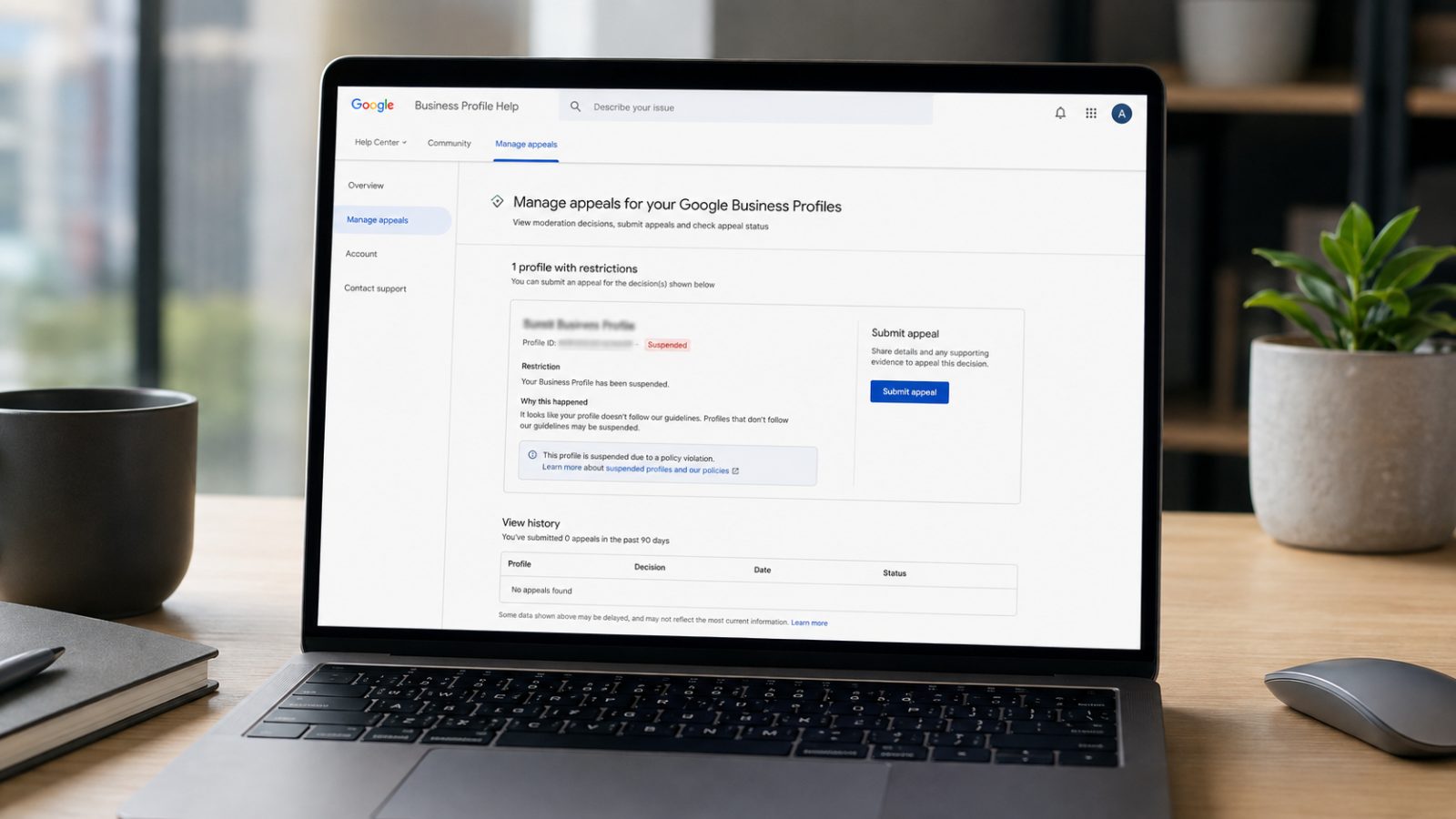
The appeal is one submission with one follow-up, so most of the work happens before you open the tool.
Fix the listing first. Correct the field the tool named. An appeal on a profile that still breaks the rule is an appeal spent for nothing.
Get the documents together before you start. Google names official business registration, a business licence, tax certificates and utility bills for the business. The name and address on them have to match the profile exactly.
Australia has no general business licence, so that list needs translating. The documents that work here are the ABN record from ABN Lookup and an ASIC company or business name extract. Add a council registration or permit if your trade needs one, a lease or rates notice, and a utility bill in the business name at the address. Photos of permanent signage help when the address is the problem. One trap: the free ASIC business names search shows only suburb, state and postcode when the holder’s address is a home address. It will not prove a street address on its own.
Read the stated reason before you write anything. It names the profile, the action taken and the policy. Match your evidence to that policy rather than sending everything you own.
Submit the appeal, then attach the evidence. The evidence form opens after submission, not before, so have the files saved and named beforehand.
Once the evidence form opens, you have 60 minutes to submit it. Miss that window and the documents are not attached to your appeal at all.
Track the status and wait. Google sends the decision by email and updates the status in the tool. It publishes no turnaround time, so plan on losing more than a week.
If it is knocked back, there is one more step. Google allows an additional review of a denied request, with evidence that was not in the first appeal. Treat it as the last one, because it is.
Do not create a second profile for the same business. Google says this directly. A duplicate does not bring the enquiries back and it hands the reviewer a second problem.
Do not keep editing the details. Each change is another edit to assess. A run of edits during an appeal looks like the behaviour that gets profiles suspended.
Do not pay anyone who rings offering to fix it. Google states it will never ask for a one-time password or a PIN. It never charges to have a profile verified or reinstated. Report the call to Scamwatch.
Do not add a stranger as an owner. Owners can edit the profile and transfer ownership away from you. Managers cannot. Anyone who genuinely needs access while this is sorted out goes on as a manager.
Point the traffic at the website meanwhile. Hours, address and phone need to sit on the page as text, not inside an image. A line on the homepage saying you are open and taking calls earns its place while the map shows nothing.

Suspensions cluster around a handful of fields. Change these deliberately, one at a time, with a reason you could explain to somebody.
The business name. It should match the shopfront, the website and the invoices. No suburb, no service, no phone number, no capitals for emphasis.
The primary category. Pick the one that finishes “this business is a”, not “this business has a”. A cafe inside a bookshop is not a category the bookshop can claim.
The address, once it is set. Moving premises is a real edit with real consequences. Do it properly, with the new address matching your registration and your signage.
Who holds access. Take ex-employees off the profile the week they leave. An owner account tied to a departed staffer’s personal Gmail is a lockout waiting to happen.
Every location you hold. Claim them all. Google warns that unclaimed listings are more open to hijacking, and a hijacked listing is a slower fix than a suspended one.
The rebrand trap
Google will change a business name in place only under narrow conditions. The proper nouns and services in the name have to stay the same, and the category cannot change. Anything beyond that counts as a new business. The old profile gets marked permanently closed and a new one is created from scratch. Worth knowing before the new signage goes up.
While a profile is removed, the public cannot reach it and the owner and managers cannot act on it. Review replies stop. Posts stop. Questions customers ask sit unanswered, in public, for as long as the appeal takes.
The profile now feeds more than Google Maps. Ask an AI assistant who services European cars near Camberwell, and the answer is built from the same business facts the profile carries. A business with no live profile is one fewer source those answers can draw on. Nothing tells the owner that has happened.
So the profile is borrowed, and somebody else can switch it off on a Tuesday. The website is owned. Anything a customer has to find at eight on a Sunday night belongs on both.
If your profile is down now, CJ Digital handles Google Business Profile reinstatements for Australian businesses. The same applies if you are about to change a name, an address or a category and would rather not learn this the hard way. Start with the Google Business Profile service page, or get in touch and we will tell you which of the three problems you have.
Google publishes no turnaround time for appeals and no standard suspension length. The decision arrives by email and the status updates in the appeals tool. In practice a straightforward name correction clears faster than anything involving an address, because address cases need documents assessed.
Reviews are attached to the profile, not deleted when it is suspended. What you lose is access. Nobody can reply to a review, answer a question or post an update while the profile is down, so a bad review landing mid-appeal sits there without a response.
You get one appeal through the appeals tool. If it is denied, Google allows one additional review of the denied request, where you can add evidence that was not in the original. After that there is no further route, which is why the fix has to be finished before the first appeal goes in.
A suspension removes the profile from Maps and the local results. Your website pages are ranked separately and stay in normal search results. The practical loss is the local enquiries that would have come through the map listing, which for most service businesses is the larger share.
No. Google states that it never charges to have a Business Profile verified or reinstated, and that it will never ask for a one-time password or a PIN. Calls like that are common and they usually want either money or access. Hang up and report it to Scamwatch.